
 Abdul Moeed
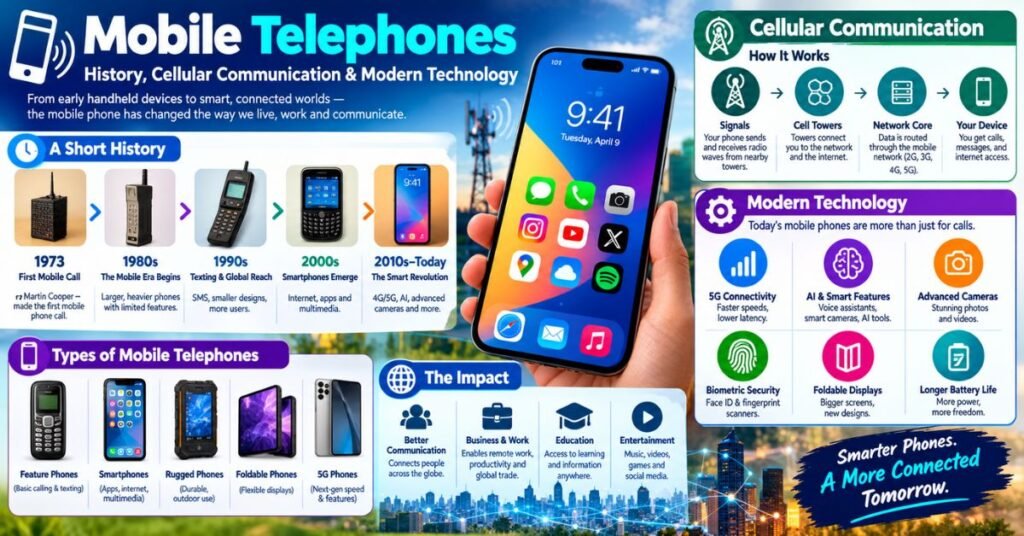
Picture a New York street in April 1973. A man lifts a heavy handset and calls a rival engineer. That call marked the first handheld mobile telephone conversation. Today your smartphone does far more than that bulky prototype ever dreamed of.
This guide follows the evolution of mobile phones from that first call to the 5G network era. You will learn how mobile phones work and how cellular communication grew from 1G to 5G. You will even see how calls happen on a plane. Along the way, you will find tips to buy, set up, and protect your mobile device.
What Is a Mobile Telephone?
A mobile telephone is a portable device that makes calls without a wire. It sends wireless signals through the air to a nearby cell tower. People also say mobile phone, cellular telephone, or cellular phone. In the United States, “cell phone” is the popular short form. All of these names describe one idea: a personal doorway into the telephone network.
Read More: Online Gaming: History, Types, Trends, and How It Works
Older phones worked differently. A landline ties you to one spot. A cordless handset works only near its base. A wireless telephone on a cellular network travels with you across cities and even countries. Modern mobile communication also goes beyond talk. Your device handles text messaging, video, maps, and payments. The table below shows key steps in the history of mobile phones.
| Year | Milestone |
| 1973 | Martin Cooper of Motorola makes the first handheld cellular call |
| 1979 | NTT opens the first commercial cellular service in Tokyo |
| 1983 | The Motorola DynaTAC 8000X goes on sale in the US for about $3,995 |
| 1992 | The first SMS is sent in the United Kingdom |
| 2007 | Apple launches the iPhone and reshapes the smartphone market |
| 2019 | Carriers begin commercial 5G service in several countries |
How Cellular Telephones Work
Think of a honeycomb. Each hexagon is a small zone called a cell. A tower sits in each zone and serves every phone inside it. This design lets cellular systems reuse the same radio frequency bands again and again. Without it, only a handful of people could call at once in a whole city.
Every call follows a simple path. Your phone sends wireless signals to a tower. The tower passes them into the network infrastructure. The network then routes them to the person you want. This is the core of how cellular communication works, and the table shows the chain in four steps.
| Step 1 | Step 2 | Step 3 | Step 4 |
| Your phone sends a signal | The cell tower receives it | The core network routes it | The other phone or server gets it |
Cellular Communication Explained
Here is the trick behind cellular communication. Engineers split a big area into many cells. Neighboring cells use different frequencies to avoid clashes. Faraway cells reuse the same ones. That reuse packs far more voice calls into limited airwaves. Bell Labs sketched this idea in the late 1940s. Then comes the handoff. As you drive from one cell to the next, the network passes your call along without a break. This smart handover explains why the word “cellular” stuck.
Mobile Networks and Cell Towers
A cell tower holds antennas and radio gear. Engineers call that gear a base station. It talks to phones over the air. Then it links to the wider network by fiber or microwave, a step known as backhaul. This mobile network infrastructure shapes your mobile network coverage. Rural areas need tall towers that reach far. Busy cities add small cells on lampposts and rooftops to share the load. Good cellular network architecture balances reach against capacity. Planners must weigh both before they place a single antenna.
How Mobile Devices Connect to Networks
Your SIM card holds your identity. It tells the carrier who you are and which plan you use. Newer phones also support eSIM, which stores that identity in software. When you switch on your phone, it scans for wireless signals and picks the strongest one. Then it registers with the carrier, and your network connection goes live. Abroad, roaming lets a partner mobile network carry your service. Check your plan first. Roaming can add surprise charges, and a recent tech story described “phantom” fees that caught a traveler off guard.
Voice, Text, and Mobile Data
Each service travels a different way. Older voice calls used dedicated circuits. Today VoLTE turns speech into data packets over 4G LTE or 5G. Text messaging by SMS rides on control channels that need very little room. Mobile data moves as internet packets, which suits video and mobile applications. This split explains why a text can arrive when a video call fails. The table compares the three.
| Service | How it travels | Best for |
| Voice call | Digital packets (VoLTE) or older circuits | Talking in real time |
| SMS text | Tiny messages on control channels | Short, reliable notes |
| Mobile data | Internet packets over the cellular network | Video, maps, apps, and browsing |
Development of Cellular Systems

The story of cellular technology reads like a relay race. Each generation grabs the baton and runs farther. Every ten years or so, a new standard arrives. It brings faster speeds and fresh uses. This steady mobile network evolution turned a simple voice service into a global platform for digital communication.
Standards groups guide the race. The sets global goals. Technical bodies like write the detailed rules. The trade group tracks how carriers adopt each step. The table below shows the 1G to 5G evolution. Speeds are rough, real-world ranges, and they vary by place and network.
| Generation | Era | Typical experience | Key change |
| 1G | 1980s | Analog voice only | First mobile telecommunications for the public |
| 2G | 1990s | Digital voice and texts | Encryption and SMS |
| 3G | 2000s | Roughly 1 to 10 Mbps | Early mobile internet |
| 4G LTE | 2010s | Roughly 10 to 100 Mbps | Streaming and app culture |
| 5G | 2019 onward | 100 Mbps to over 1 Gbps in the best cases | Low delay and massive device links |
First-Generation (1G) Mobile Networks
The 1G network used analog radio and carried voice only. NTT opened the first commercial system in Tokyo in 1979. The Nordic countries followed with NMT in 1981. The United States launched AMPS in 1983. Handsets weighed a lot and cost a fortune. Calls also had weak privacy, because anyone with a scanner could listen in. Still, this era proved something big. People wanted to talk on the move. That demand pushed engineers to build better wireless communication systems.
Read More: Denago Golf Carts: 2026 Models, Features & Key Benefits
2G, 3G, and 4G Evolution
The 2G network went digital in the early 1990s. GSM launched in Finland in 1991 and brought clearer calls plus text messaging. The 3G network arrived in 2001 in Japan. It opened the door to early mobile broadband and picture messages. Then 4G LTE appeared in Scandinavia in 2009 and made streaming normal. Here is a real case study. In 2007, Safaricom and Vodafone launched M-Pesa in Kenya. Users moved money through simple phone menus on basic handsets. Millions gained banking-style mobile services without visiting a branch.
The Rise of 5G Technology
The 5G network began rolling out in 2019. It promises higher speeds and very low delay. Low bands travel far. Mid bands balance speed and reach. High millimeter-wave bands deliver huge speeds over short distances. Real results vary by band, place, and crowd. Beyond phones, 5G links sensors, cars, and factory machines. It also helps cloud gaming feel smoother. These cellular technology advancements even make home internet access possible over the air in some areas. That shift shows how mobile internet technology now competes with wired service.
The Future of Mobile Networks
What comes next? Researchers already study 6G, which many expect around 2030. The and industry groups are shaping its goals. Satellite-to-phone links may fill gaps where towers can’t reach. Artificial intelligence may also tune next-generation mobile networks on the fly to save power. These ideas remain in development, so timelines may shift. Still, the future of mobile communication looks faster, wider, and smarter. Expect more wireless connectivity in places that have none today.
Airborne Cellular Systems
How does a phone work 35,000 feet up? The answer lies in airborne cellular systems. They form a special branch of cellular telephone technology built for moving aircraft. A jet travels around 900 kilometers per hour. Ground towers were never designed for that kind of speed.
Engineers found three main paths for in-flight mobile connectivity. Each one solves the problem in a different way. Some use towers on the ground. Others use satellites in orbit. A third type puts a mini tower inside the cabin. The table compares them.
| Path | How it works | Typical use |
| Air-to-ground | Ground towers aim antennas at the sky and link to the plane | Domestic flights over land |
| Satellite | The aircraft antenna talks to a satellite | Long routes over oceans |
| Onboard picocell | A small cabin cell serves phones and uses satellite backhaul | Onboard mobile phone service |
How Airborne Mobile Communication Works
On an air-to-ground system, special antennas on an aircraft’s belly connect to towers below. On a satellite system, a dish on the fuselage links to a satellite overhead. An onboard picocell acts like a tiny cell tower inside the cabin. Your phone connects to it, and the picocell sends data transmission to the ground through a satellite link. A famous case study came in 2008. Emirates began offering AeroMobile service on some flights, and it became one of the first commercial onboard mobile services.
Mobile Connectivity on Aircraft
In-flight Wi-Fi and onboard mobile service are not the same thing. Wi-Fi lets your mobile device join the plane’s internet. Onboard mobile service lets your phone use its own number through the plane’s picocell. Airplane mode still matters. It stops your phone from hunting for ground towers at high speed. Regulators such as the have long restricted use of ordinary ground cellular networks from aircraft. Rules differ by country and airline, so check before you fly.
Challenges of Airborne Cellular Networks
Flying creates hard problems. A fast jet moves through many cells in minutes, which strains handoffs. Signals from a plane can reach many ground towers at once and cause interference. Bandwidth is limited, and a whole cabin must share it. Geostationary satellites sit far away, so signals take about half a second to make a round trip. Costs run high for airlines too. Add strict regulation, and you can see why in-flight mobile connectivity improves slowly.
Modern Mobile Technology
Today’s mobile telephone acts as a camera, wallet, map, and pocket computer. Computer scientist Mark Weiser once wrote this line about technology:
“The most profound technologies are those that disappear.”
That idea fits the phone well. You stop noticing the tower, the radio, and the code. You just tap and talk.
This shift shaped smartphone development over two decades. Modern mobile technology blends phone hardware, phone software, and mobile communication technology into one slim device. Each part depends on the others. A fast chip means little without a good cellular network. A great network means little without smart apps.
Mobile Phone Features
Cameras lead the pack. Many phones now shoot sharp photos in dim light. Fingerprint and face unlock protect your data. Wireless charging removes cable clutter, and magnetic accessories snap on neatly. Foldable screens turn one phone into a small tablet. Among the types of mobile phones, you can find basic feature phones, standard smartphones, rugged models, foldables, and even satellite units. Each type serves a different need. Strong mobile phone features matter most when they solve a problem you face daily.
Smartphone Hardware and Software
Inside every phone sits a chip called a system on a chip. It handles the processor, graphics, and radio frequency modems together. RAM keeps apps ready to switch. The battery and display decide how long and how well you can use the phone. On the software side, a mobile operating system such as Android or iOS runs everything. It manages mobile applications, security, and updates. Modern smartphone technology also adds on-device AI for photos, voice typing, and live translation. Better chips and smarter software often arrive together.
Mobile Internet and Connectivity
Your phone links to the web in several ways. The 5G network and 4G LTE give you mobile broadband on the go. Wi-Fi 6 and Wi-Fi 7 give faster home and office speeds. A hotspot shares your phone’s mobile data with a laptop. eSIM plans help travelers add local service without swapping a card. This mix of options gives you strong smartphone connectivity almost anywhere. Good mobile connectivity now feels like a basic utility, much like water or power.
Mobile Reviews and Best Products
Shopping for a mobile phone can feel like wandering through an electronics maze. Every brand claims the best camera and the longest battery. This section helps you cut through the noise. It explains how to read a review and what to compare.
Tech sites publish fresh mobile phone reviews every week. As of September 2026, recent headlines cover the Pixel 11 Pro, the Pixel 11 Pro Fold, and the Motorola Razr Ultra (2026). Treat those as starting points. Always confirm current models, prices, and update promises before you spend money.
Mobile Phone Reviews
A good review tells you how a phone behaves after weeks of daily use. Look for real battery tests instead of spec sheets. Check camera samples in low light. Notice how the reviewer judges heat, speed, and software polish. Ignore hype about tiny benchmark gaps, since you will never feel them. Also watch for sponsored content, which sites should label. Trust writers who name flaws as clearly as strengths. Compare at least three sources before you decide.
Best Mobile Phones
The best pick depends on your needs, not on one universal winner. A photographer wants strong cameras. A traveler wants long battery life and eSIM support. A budget buyer wants solid value. The table lists common needs with example models from recent headlines. It does not rank them or endorse them. Read current reviews before you buy.
| Need | What to look for | Example from recent coverage |
| Camera focus | Large sensors and strong image processing | Google Pixel 11 Pro |
| Big-screen power | Bright display and long battery | Samsung Galaxy S26 Ultra |
| Foldable | Sturdy hinge and useful inner screen | Google Pixel 11 Pro Fold |
| Flip style | A handy cover screen | Motorola Razr Ultra (2026) |
| Physical keyboard | Real keys and a solid typing feel | Clicks Communicator |
| Rugged and push-to-talk | Tough build and walkie-talkie features | Unihertz Atom XL |
Mobile Features to Consider
Specs can overwhelm you, so focus on what you will use. Battery life decides how stressful your day feels. Software update promises decide how long the phone stays safe. Band support decides whether your carrier’s 5G network works well. The table below turns these points into a quick checklist you can carry to the store.
| Feature | Why it matters |
| Battery | Shows how far you get before you need a charger |
| Display | Affects brightness, smoothness, and eye comfort |
| Update policy | Sets how many years of security fixes you receive |
| Storage | Keeps photos, apps, and offline files from filling up |
| 5G band support | Ensures the phone works on your carrier’s bands |
| Repairability | Lowers the cost of a cracked screen or a tired battery |
Mobile Buying Guides
A simple mobile phone buying guide starts with your budget. Next, pick a platform. Android and iPhone each have strengths, and your current apps may decide for you. Then list your must-have features, such as camera, battery, or size. After that, check your carrier. Compare mobile services, coverage maps, and whether the phone accepts your SIM card or eSIM. Finally, read two or three fresh reviews. This path keeps you calm and helps you avoid paying for features you never use.
Mobile How-To Guides
Owning a mobile device is easy. Getting the most from it takes a few smart habits. This section covers setup, fixes, and safety. Each tip works on most modern phones.
Most problems have simple answers. A restart fixes many glitches. A software update fixes more. Save complex steps for last. Good habits also keep your phone technology running longer and safer.
Mobile Phone Setup and Configuration
Start with a full backup of your old phone. Next, insert your SIM card or activate an eSIM. Then follow the on-screen guide to copy contacts, photos, and mobile applications. Sign in to your main account so the mobile operating system can restore your settings. After that, update the phone software right away. Finally, tune your notifications. Turn off alerts you don’t need. Set a screen lock and switch on device tracking. Setup takes about half an hour. It saves hours of trouble later.
Troubleshooting Common Mobile Problems
Most everyday faults have quick fixes. Try the simple step first and move on only if it fails. The table covers five common issues.
| Problem | Quick fix |
| No signal | Toggle airplane mode, restart the phone, reseat the SIM card, and check for a carrier outage |
| Fast battery drain | Review battery usage, lower brightness, close heavy apps, and install updates |
| Texts missing from an iPhone | Ask the sender to turn off iMessage, or deregister your old number from Apple’s service |
| Overheating | Remove the case, pause charging during games, and keep the phone out of direct sun |
| Slow mobile data | Switch between 5G and 4G LTE, check your data cap, and reset network settings |
Mobile Security and Privacy
Your phone holds your money, photos, and private chats, so protect it well. Install updates fast, because they patch known holes. Review app permissions and remove access that an app doesn’t need. Use a strong screen lock and turn on two-step login for key accounts. Watch out for SIM-swap fraud, where a thief tricks a carrier into moving your number. Add a PIN on your carrier account to help stop it. Avoid sensitive tasks on public Wi-Fi. Safe habits keep your digital communication private.
Latest Mobile News and Trends
Mobile technology trends move fast. A feature that feels new in spring feels normal by winter. That pace keeps this topic exciting. It also means every fact here needs a fresh check before you act.
Here is a snapshot of the latest mobile news from September 18 to 20, 2026. Coverage discusses Android 17 QPR1, the Pixel 11 Pro, and the Galaxy S26 series. Writers also debate whether the iPhone 18 Pro justifies its $1,200 price. Treat these stories as signals, not final verdicts.
New Mobile Technology
Fresh software and hardware keep arriving. One recent story asks whether Android 17 QPR1 causes issues on Pixel phones. Another says the same update fixes a major headache for enthusiasts. Google is also rolling out a redesign of Pixel VIPs and improving Calling Cards. Meanwhile, reviewers test faster wireless charging and magnetic Qi2.2 power banks. Foldables keep growing too, and wallpaper roundups for the Galaxy Z Fold 8 hint at a busy season. These stories show steady cellular technology advancements in daily-use tools.
Smartphone Industry Trends
Prices and lifespan lead the debate. Flagship phones cost more, so buyers ask what they truly gain. Brands respond with longer update promises and easier repairs. Sustainability also matters, as more people keep phones for four or five years. One headline even jokes about a “RAM crisis,” which hints at pressure on memory supply. At the same time, some users want calmer phones and try focus apps instead of buying a basic “dumbphone.” Expect more choice and more careful shoppers.
Mobile Network Developments
Carriers keep expanding mobile network coverage and upgrading their network infrastructure. Many now run standalone 5G, which uses a newer core for lower delay. Satellite messaging is spreading, and it helps people in remote areas. Travelers still watch roaming rules, since surprise fees remain a real risk. Plan changes also shape choices, as shown by fresh guides for people leaving a major US carrier in 2026. For deeper industry data, visit the and
Frequently Asked Questions
What Is a Mobile Telephone?
A mobile telephone is a portable device that sends and receives calls and data through radio waves. It connects to a cellular network instead of a wire. Most people now use a smartphone, which adds apps, a camera, and mobile internet to everyday voice calls.
How Does Cellular Communication Work?
Cellular communication splits a region into small cells. Each cell has a cell tower that talks to phones using radio frequency signals. As you move, the network hands your call to the next tower. Because far-apart cells reuse the same frequencies, many people share limited airwaves at once.
How Have Mobile Networks Developed?
The 1G network carried analog voice. The 2G network added digital calls and texts. The 3G network brought early mobile data. 4G LTE made streaming normal. The 5G network adds higher speeds and low delay. Each step improved wireless connectivity and opened new mobile services for everyday users.
What Is an Airborne Cellular System?
An airborne cellular system lets passengers use mobile communication on a plane. It relies on air-to-ground towers, satellites, or an onboard picocell. Unlike simple in-flight Wi-Fi, it can connect your own phone to the aircraft’s network. Your SIM card may then work in flight.